2023年6月 - 新的 CLI,样式及更多
完整重写的 CLI,带来新的样式、主题选项及更多功能。
我今天有很多更新要和你分享:
- 新的 CLI - 从零重写了 CLI。你现在可以添加组件、依赖项以及配置导入路径。
- 主题化 - 你可以选择使用 CSS 变量或者 Tailwind CSS 工具类来进行主题设置。
- 基础颜色 - 配置项目的基础颜色。该颜色将用于生成组件的默认调色板。
- React 服务器组件 - 可选择不使用 React 服务器组件。CLI 会自动添加或移除
use client指令。 - 样式 - 引入了一个名为 Style(样式)的新概念。样式带有自己的一套组件、动画、图标等。
- 退出动画 - 为所有组件新增了退出动画。
- 其他更新 - 新增了
icon按钮尺寸、更新了sheet组件等等。 - 更新你的项目 - 如何更新你的项目以获得最新变化。
新的 CLI
过去几周我一直在开发一个新的 CLI。这是一次完全重写,带来了很多新功能和改进。
init
执行 init 命令时,会询问你一些配置 components.json 的问题:
Which style would you like to use? › Default
Which color would you like to use as base color? › Slate
Where is your global CSS file? › › app/globals.css
Do you want to use CSS variables for colors? › no / yes
Where is your tailwind.config.js located? › tailwind.config.js
Configure the import alias for components: › @/components
Configure the import alias for utils: › @/lib/utils
Are you using React Server Components? › no / yes该文件包含了关于组件的所有信息:安装位置、导入路径、样式方式等。
你可以用这个文件更改组件的导入路径,设置基础颜色或更改样式方法。
{
"style": "default",
"tailwind": {
"config": "tailwind.config.ts",
"css": "src/app/globals.css",
"baseColor": "zinc",
"cssVariables": true
},
"rsc": false,
"aliases": {
"utils": "~/lib/utils",
"components": "~/components"
}
}这意味着你现在可以在包括 src 和 app 目录的任何目录结构下使用 CLI。
add
add 命令现在功能更强大。你不仅可以添加 UI 组件,还可以导入更复杂的组件(即将推出)。
CLI 会自动解析所有组件及依赖,基于你的自定义配置进行格式化,并添加到你的项目中。
diff(实验性)
我们还引入了一个新命令 diff 来帮你跟踪上游更新。
你可以使用此命令查看上游仓库中发生的更改,并据此更新你的项目。
运行 diff 命令可获取有更新的组件列表:
以下组件有可用更新:
- button
- /path/to/my-app/components/ui/button.tsx
- toast
- /path/to/my-app/components/ui/use-toast.ts
- /path/to/my-app/components/ui/toaster.tsx然后运行 diff [component] 查看具体更改:
const alertVariants = cva(
- "relative w-full rounded-lg border",
+ "relative w-full pl-12 rounded-lg border"
)使用 CSS 变量或 Tailwind 颜色进行主题化
你可以选择使用 CSS 变量或 Tailwind CSS 工具类进行主题设置。
当你添加新组件时,CLI 会自动根据你的 components.json 配置使用正确的主题方法。
工具类
<div className="bg-zinc-950 dark:bg-white" />若要使用工具类进行主题,请将 components.json 中的 tailwind.cssVariables 设置为 false。
{
"tailwind": {
"config": "tailwind.config.js",
"css": "app/globals.css",
"baseColor": "slate",
"cssVariables": false
}
}CSS 变量
<div className="bg-background text-foreground" />若要使用 CSS 变量进行主题,请将 components.json 中的 tailwind.cssVariables 设置为 true。
{
"tailwind": {
"config": "tailwind.config.js",
"css": "app/globals.css",
"baseColor": "slate",
"cssVariables": true
}
}基础颜色
你现在可以配置项目的基础颜色,用于生成组件的默认调色板。
{
"tailwind": {
"config": "tailwind.config.js",
"css": "app/globals.css",
"baseColor": "zinc",
"cssVariables": false
}
}可选颜色包括 gray、neutral、slate、stone 或 zinc。
如果 cssVariables 设置为 true,我们会在你的 globals.css 文件中将基础颜色设置为 CSS 变量。如果设置为 false,则会在组件中内联 Tailwind CSS 工具类。
React 服务器组件
如果你使用的框架不支持 React 服务器组件,你现在可以通过将 rsc 设置为 false 来选择不使用。添加组件时,我们会自动添加或移除 use client 指令。
{
"rsc": false
}样式
我们引入了一个名为 样式 的新概念。
你可以把样式看作视觉基底:形状、图标、动画和排版。 一种样式包含自己的一套组件、动画、图标及更多。
目前我们提供两种样式:default 和 new-york(未来会陆续推出更多)。
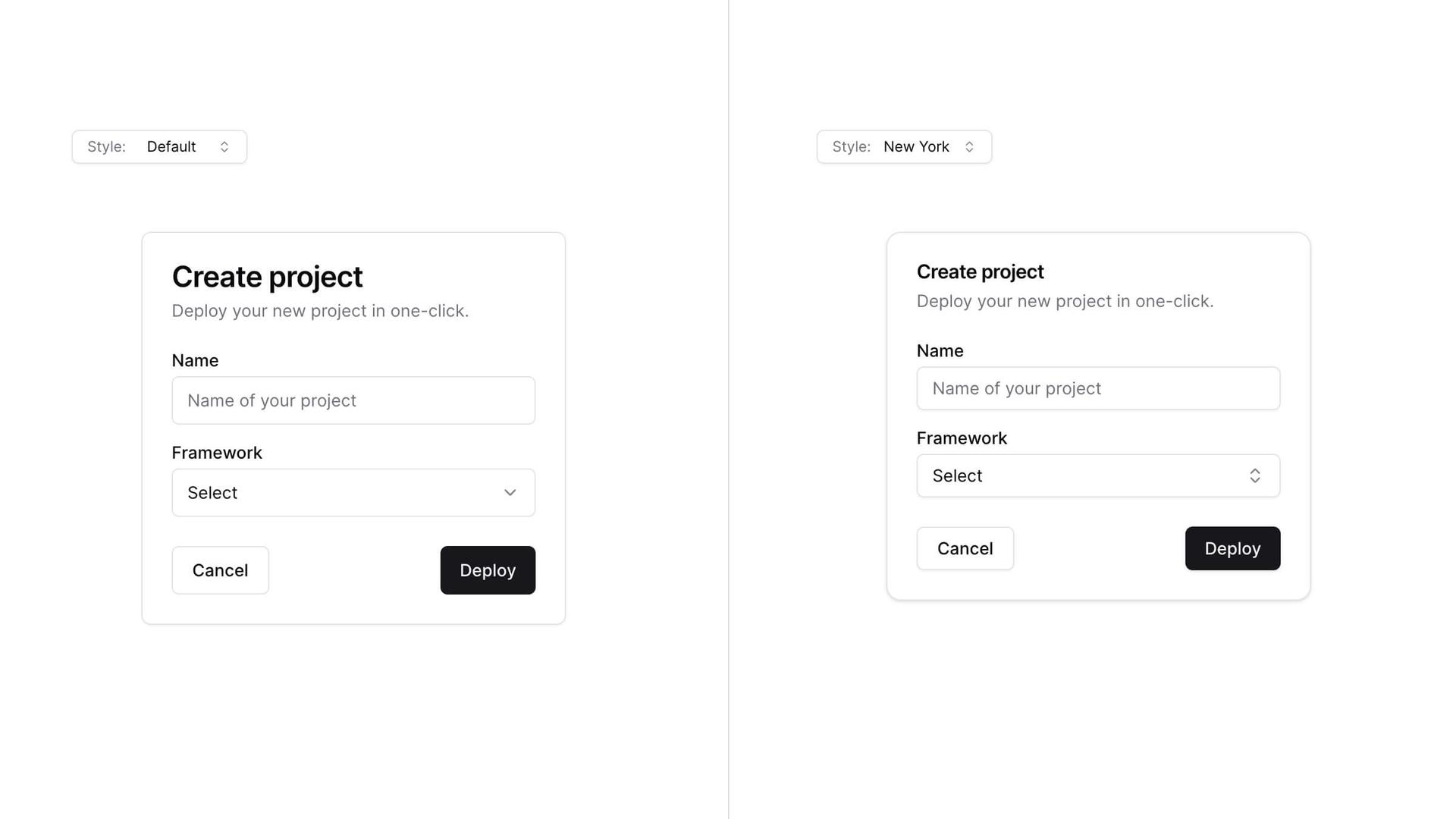
default 样式是你习惯的,它是我们项目伊始一直使用的样式。它使用 lucide-react 提供图标,tailwindcss-animate 提供动画。
new-york 样式是新风格。它含有更小的按钮、带阴影的卡片以及来自 Radix Icons 的新图标集。
执行 init 命令时,会询问你想使用哪种样式,此配置保存在你的 components.json 文件中。
{
"style": "new-york"
}主题化
在样式的基础上,使用 CSS 变量或 Tailwind CSS 工具类进行主题化,彻底改变组件外观。

退出动画
我为所有组件添加了退出动画。点击下面的组合框即可看到细微的退出动画效果。
动画可以通过工具类进行自定义。
其他更新。
按钮
- 新增了按钮尺寸
icon:
抽屉(Sheet)
- 将
position属性重命名为side,以符合其他元素命名。
- 移除了
size属性。请使用className="w-[200px] md:w-[450px]"实现响应式大小。
更新你的项目
由于我们采用复制粘贴的方式,你需要手动更新你的项目以获得最新变化。
注意:我们正在开发一个 diff 命令来帮助你跟踪上游更新。
添加 components.json
在项目根目录创建一个 components.json 文件:
{
"style": "default",
"rsc": true,
"tailwind": {
"config": "tailwind.config.js",
"css": "app/globals.css",
"baseColor": "slate",
"cssVariables": true
},
"aliases": {
"components": "@/components",
"utils": "@/lib/utils"
}
}根据你的项目结构更新 tailwind.css 和 aliases 的值。
按钮
在 buttonVariants 中添加 icon 尺寸:
const buttonVariants = cva({
variants: {
size: {
default: "h-10 px-4 py-2",
sm: "h-9 rounded-md px-3",
lg: "h-11 rounded-md px-8",
icon: "h-10 w-10",
},
},
})抽屉(Sheet)
- 用以下代码替换
sheet.tsx的内容:
"use client"

import * as React from "react"
import * as SheetPrimitive from "@radix-ui/react-dialog"
import { cva, type VariantProps } from "class-variance-authority"
import { X } from "lucide-react"
import { cn } from "@/lib/utils"
const Sheet = SheetPrimitive.Root
const SheetTrigger = SheetPrimitive.Trigger
const SheetClose = SheetPrimitive.Close
const SheetPortal = ({
className,
...props
}: SheetPrimitive.DialogPortalProps) => (
<SheetPrimitive.Portal className={cn(className)} {...props} />
)
SheetPortal.displayName = SheetPrimitive.Portal.displayName
const SheetOverlay = React.forwardRef<
React.ElementRef<typeof SheetPrimitive.Overlay>,
React.ComponentPropsWithoutRef<typeof SheetPrimitive.Overlay>
>(({ className, ...props }, ref) => (
<SheetPrimitive.Overlay
className={cn(
"fixed inset-0 z-50 bg-background/80 backdrop-blur-sm data-[state=closed]:animate-out data-[state=closed]:fade-out-0 data-[state=open]:animate-in data-[state=open]:fade-in-0",
className
)}
{...props}
ref={ref}
/>
))
SheetOverlay.displayName = SheetPrimitive.Overlay.displayName
const sheetVariants = cva(
"fixed z-50 gap-4 bg-background p-6 shadow-lg transition ease-in-out data-[state=closed]:animate-out data-[state=closed]:duration-300 data-[state=open]:animate-in data-[state=open]:duration-500",
{
variants: {
side: {
top: "inset-x-0 top-0 border-b data-[state=closed]:slide-out-to-top data-[state=open]:slide-in-from-top",
bottom:
"inset-x-0 bottom-0 border-t data-[state=closed]:slide-out-to-bottom data-[state=open]:slide-in-from-bottom",
left: "inset-y-0 left-0 h-full w-3/4 border-r data-[state=closed]:slide-out-to-left data-[state=open]:slide-in-from-left sm:max-w-sm",
right:
"inset-y-0 right-0 h-full w-3/4 border-l data-[state=closed]:slide-out-to-right data-[state=open]:slide-in-from-right sm:max-w-sm",
},
},
defaultVariants: {
side: "right",
},
}
)
interface SheetContentProps
extends React.ComponentPropsWithoutRef<typeof SheetPrimitive.Content>,
VariantProps<typeof sheetVariants> {}
const SheetContent = React.forwardRef<
React.ElementRef<typeof SheetPrimitive.Content>,
SheetContentProps
>(({ side = "right", className, children, ...props }, ref) => (
<SheetPortal>
<SheetOverlay />
<SheetPrimitive.Content
ref={ref}
className={cn(sheetVariants({ side }), className)}
{...props}
>
{children}
<SheetPrimitive.Close className="absolute top-4 right-4 rounded-sm opacity-70 ring-offset-background transition-opacity hover:opacity-100 focus:ring-2 focus:ring-ring focus:ring-offset-2 focus:outline-none disabled:pointer-events-none data-[state=open]:bg-secondary">
<X className="h-4 w-4" />
<span className="sr-only">关闭</span>
</SheetPrimitive.Close>
</SheetPrimitive.Content>
</SheetPortal>
))
SheetContent.displayName = SheetPrimitive.Content.displayName
const SheetHeader = ({
className,
...props
}: React.HTMLAttributes<HTMLDivElement>) => (
<div
className={cn(
"flex flex-col space-y-2 text-center sm:text-left",
className
)}
{...props}
/>
)
SheetHeader.displayName = "SheetHeader"
const SheetFooter = ({
className,
...props
}: React.HTMLAttributes<HTMLDivElement>) => (
<div
className={cn(
"flex flex-col-reverse sm:flex-row sm:justify-end sm:space-x-2",
className
)}
{...props}
/>
)
SheetFooter.displayName = "SheetFooter"
const SheetTitle = React.forwardRef<
React.ElementRef<typeof SheetPrimitive.Title>,
React.ComponentPropsWithoutRef<typeof SheetPrimitive.Title>
>(({ className, ...props }, ref) => (
<SheetPrimitive.Title
ref={ref}
className={cn("text-lg font-semibold text-foreground", className)}
{...props}
/>
))
SheetTitle.displayName = SheetPrimitive.Title.displayName
const SheetDescription = React.forwardRef<
React.ElementRef<typeof SheetPrimitive.Description>,
React.ComponentPropsWithoutRef<typeof SheetPrimitive.Description>
>(({ className, ...props }, ref) => (
<SheetPrimitive.Description
ref={ref}
className={cn("text-sm text-muted-foreground", className)}
{...props}
/>
))
SheetDescription.displayName = SheetPrimitive.Description.displayName
export {
Sheet,
SheetTrigger,
SheetClose,
SheetContent,
SheetHeader,
SheetFooter,
SheetTitle,
SheetDescription,
}- 将
position重命名为side
- <Sheet position="right" />
+ <Sheet side="right" />感谢
感谢所有使用、反馈并贡献这个项目的朋友们。我非常感激你们的支持。谢谢。